Content Manager Guide
Welcome! This section is for marketers, content creators, and business users — anyone who manages what customers see in your app or on your website. You don't need to write code, and you won't find any here. Your developers integrate BILDIT once; after that, you build, schedule, and publish content yourself in the Visual Experience Engine (VXE) — the admin you log into. Some screens still say Live Editor or CMS on buttons and menus; that's the same product.
If you're a developer looking for SDK setup, integrations, or API references, head to the technical sections in the sidebar instead.
The two places you'll work
BILDIT gives you a VXE for each surface you manage:
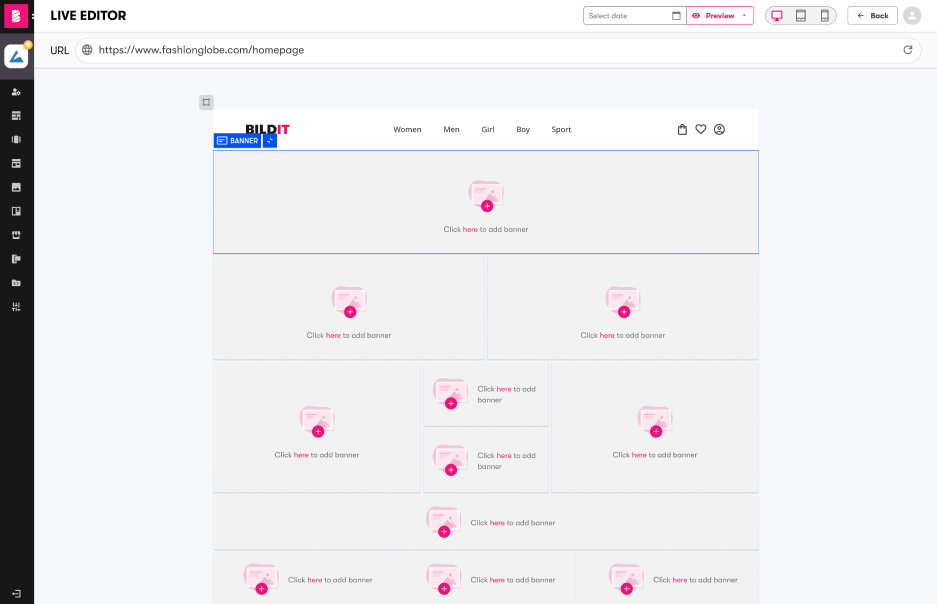
- Web VXE — edits your website. Open Scheduled Content → Live Editor, then fill named regions of a page (called slots) with content, preview it on desktop, tablet, and mobile, and publish without waiting for a site deploy.
- Mobile App VXE — edits your mobile app. You manage scheduled content, app screens, categories, and push notifications, and changes reach your app without an app-store release.
You switch between apps and websites with the switcher in the top-left corner. Every entry shows an environment badge — usually Production (what customers see) or Staging (a safe copy for trying things out). Some workspaces also show Development. Everything you edit is scoped to the app or website you've selected, so always glance at the switcher before you start editing.
What you can do yourself — and what needs a developer
You can do these on your own:
- Create, edit, and reorder Scheduled Content — the promos and messages your customers see
- Fill templates with your own text, images, colors, and links
- Upload and organize images and videos
- Schedule content to go live (and come down) automatically
- Preview content by device and by date before anyone sees it
- Send and schedule push notifications
- Hide or reorder your app's categories
Ask your developer (or your BILDIT team) for these:
- Building new templates or components (they're code under the hood)
- Adding new slots to your website's pages
- Connecting integrations — analytics, push notification services, your commerce platform
- Anything on the live site that looks wrong even though the VXE shows it correctly
I want to…
| I want to… | Go to |
|---|---|
| Upload images or videos, or manage reusable content blocks | Uploading & Managing Assets |
| Create scheduled content, or edit something that's already live | Creating & Modifying Scheduled Content |
| Change a page layout, use a template, or rearrange content | Creating & Modifying Layouts |
| Schedule a campaign, preview it, and publish it | Publishing & Scheduling Content |
| Send a push notification or generate email subject lines | Push Notifications & Email Tools |
| Look up a term the docs keep using | Glossary of Terms |
| Fix something that isn't working | Troubleshooting |
| Get a quick answer to a "how do I…" question | FAQs |
Style-guide configuration and analytics dashboards aren't self-serve yet — see the FAQs for who to contact.