Email Subject Line Generator
The Email Subject Line Generator helps marketing teams quickly create subject lines and pre-headers for email campaigns. It uses AI-generated suggestions, applies content safety checks, and supports optional AMP script preparation workflows.
Accessing the Tool
- In the CMS sidebar, go to Copy.
- Select Create Email Subj.
- Open route pattern:
/apps/:appId/email-subject-lines/create-new. - Access to this feature requires the
copyfeature key.
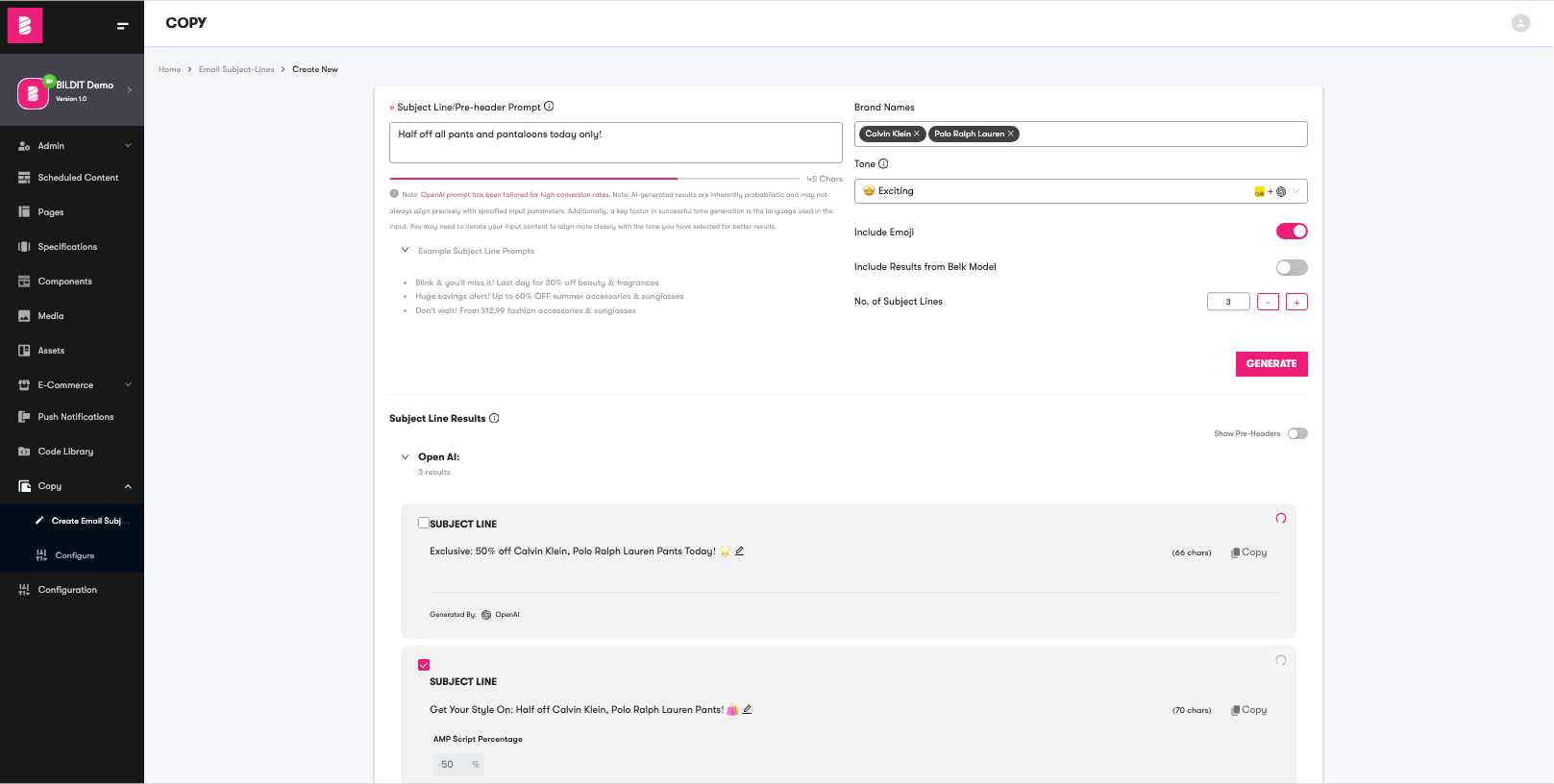
How to Generate Subject Lines
- Enter your campaign idea in Subject Line/Pre-header Prompt.
- Optionally add one or more entries in Brand Names.
- Choose a Tone that matches your campaign goal.
- Toggle Include Emoji on or off.
- Optionally enable Include Results from Belk Model.
- Set No. of Subject Lines (from 1 to 20).
- Click Generate.
info
The Belk Model option is a legacy feature. Prefer the default generator output for standard usage unless your team still relies on legacy comparisons.
Form Values
| Name | Type | Description | Default |
|---|---|---|---|
| Subject Line/Pre-header Prompt | String | Main input that describes the campaign, offer, or message intent. | Empty |
| Brand Names | Array | Optional multi-select brands to include in generated copy. | Empty |
| Tone | Option | Optional tone for style guidance (for example, exciting, urgent, love). | Empty |
| Include Emoji | Boolean | Controls whether generated output should include emojis. | true |
| Include Results from Belk Model | Boolean | Optional legacy result source for comparison. | false |
| No. of Subject Lines | Number | Number of generated rows. Accepted range: 1-20. | 1 |
Understanding Results
- Results appear in grouped sections such as OpenAI and optional Belk Model output.
- Each result includes Subject Line and optional Pre-Header text.
- You can edit generated values inline before copying.
- Character counts appear next to each field to help with email constraints.
- Use Copy to copy individual entries and Refresh to regenerate a row.
Content Filtering and Formatting
- Block-listed words are highlighted with strikethrough formatting.
- Profanity filtering is applied before final display.
- Brand formatting preserves special trademark symbols where supported.
- Output formatting enforces AP-style list handling for brand names.
- The word "free" may be normalized to "FREE" in generated output.
- Emoji formatting rules limit clustering and spacing issues.
tip
For better output quality, include concrete offer details in your prompt (for example, percentages, price values, and campaign context), then test a second tone variant if the first result set feels off-brand.
info
Expected content constraints:
- Subject lines target 41-64 characters.
- Pre-headers target 40-130 characters.
- Emoji usage is limited and spacing is normalized.
- Final copy may still require manual review before publishing.